h2 데이터를 설치하고 Spring에 연결하자.
다운로드 url : https://www.h2database.com/html/download-archive.html
Archive Downloads
www.h2database.com
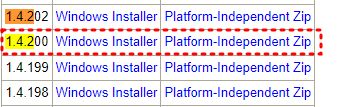
1) version : 1.4.200 을 설치
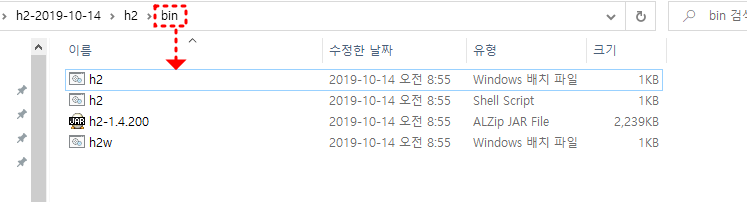
2) 설치 파일을 압축을 풀은 후 h2.bat 파일을 실행
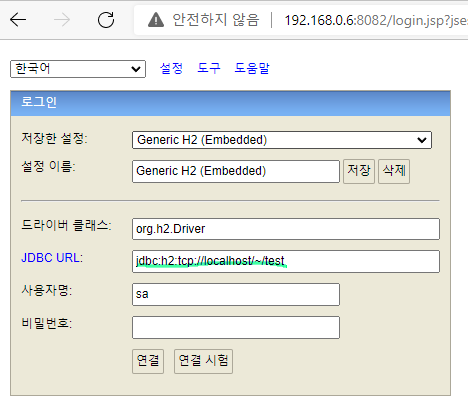
3) JDBC url을 프로토콜로 연결하자.
4) 멤버 테이블 생성
CREATE TABLE member(
   id bigint generated by default as identity,
   name VARCHAR(255),
  primary key (id)
);
5) Spring H2 DataBase 연동
- build.gradle의 dependencies에 implementation을 사용해 외부 라이브러리를 받는다.
dependencies {
implementation 'org.springframework.boot:spring-boot-starter-thymeleaf'
implementation 'org.springframework.boot:spring-boot-starter-web'
implementation 'org.springframework.boot:spring-boot-starter-jdbc'
runtimeOnly 'com.h2database:h2'
testImplementation 'org.springframework.boot:spring-boot-starter-test'
}- application.properties에 우리의 DB의 정보를 입력한다.
spring.datasource.url=jdbc:h2:tcp://localhost/~/test
spring.datasource.driver-class-name=org.h2.Driver
이제 Srping에서 DB연결하는 환경설정을 완료하였고
Spring에서 DB를 사용해보자!
이 글은 인프런의
제목 : 스프링 입문 - 코드로 배우는 스프링 부트, 웹 MVC, DB 접근 기술
강사 : 김영한 님의 동영상을 참조해 만들었습니다.
'Spring > 스프링 입문' 카테고리의 다른 글
| 스프링 통합 테스트 (0) | 2022.03.08 |
|---|---|
| 순수 JDBC 사용 및 연동 (0) | 2022.03.08 |
| 회원 웹 기능 - 등록, 출력 (0) | 2022.03.08 |
| 자바 코드로 직접 스프링 빈 등록하기 (0) | 2022.03.07 |
| 컴포넌트 스캔과 자동 의존관계 설정 (0) | 2022.03.07 |